Get in touch with Zeyu lntelligent Industrial Company

Automated Production Line Guide: Flow, Control and Output

Updated October 2026
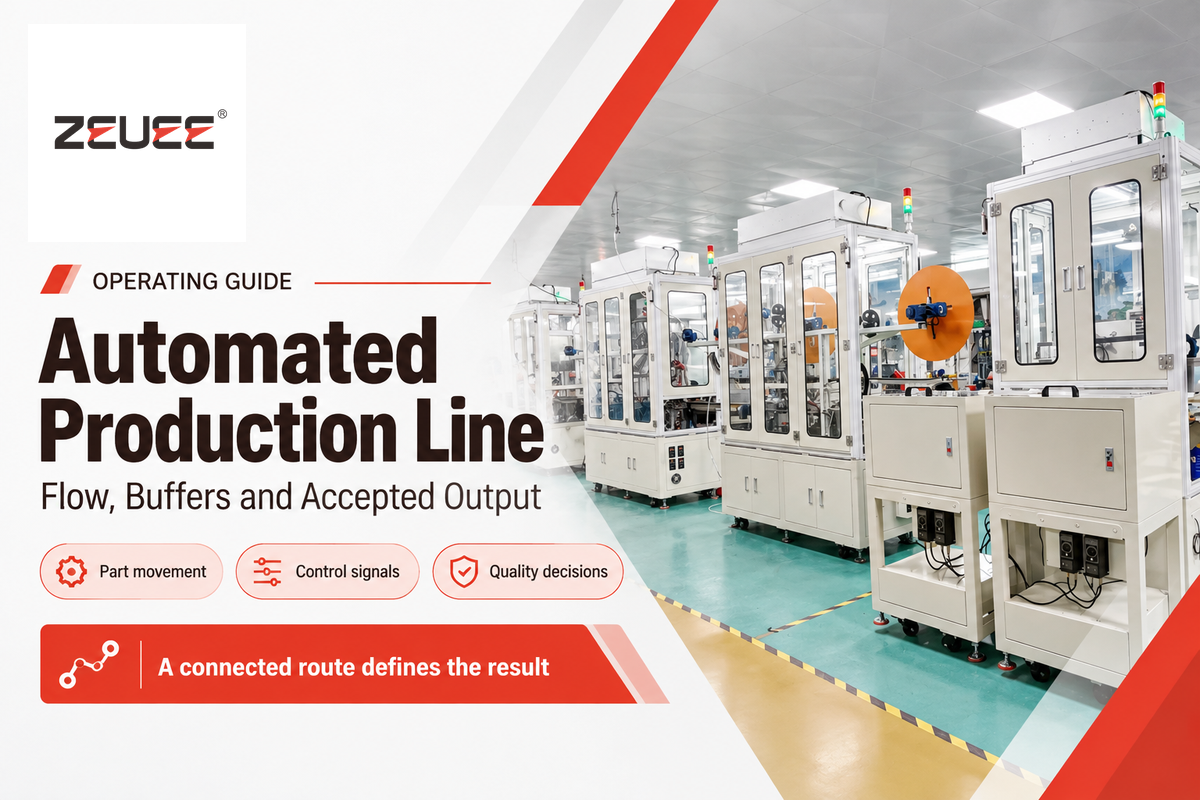
An automated production line links workstations and material transport and combines them with control systems to complete a task in a defined sequence. Machines can finish their own task while the next station is occupied. Waiting time explains why a quick machine doesn’t result in a quick line.
An automated production line coordinates processing, part movement and quality decisions across connected stations. Its usable output is the number of accepted products leaving a defined boundary per unit of time.
Quick Specs: What to Measure
| Demand | Required good pieces within available production time |
| Flow | Part entry, transfer, waiting and final exit |
| Quality boundary | Released pieces, separate from scrap and held stock |
- Increasing a nonconstraint machine’s speed can increase waiting inventory without increasing finished output.
- Demand takt, station cycle time and total flow time answer different questions.
- A buffer protects flow only while it has the stock or free space the interruption requires.
- A completed-parts counter can include products that haven’t passed final quality release.
What Is an Automated Production Line?
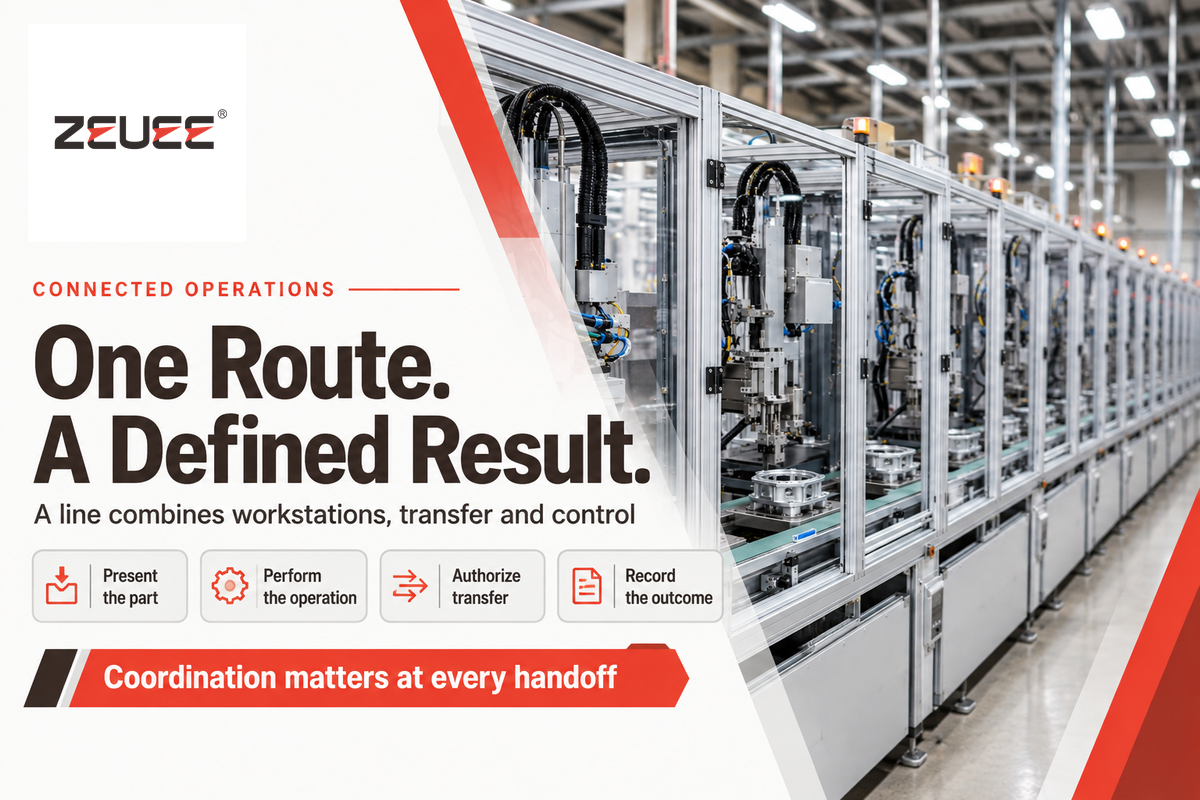
An automated production line is a connected manufacturing system in which machines perform successive operations and transfer parts, usually under coordinated control. Processing can include machining, joining, testing or packaging. An assembly line joins components; a broader production system can also transform the material before product assembly begins.
Automation technology performs repetitive tasks through programmed sequences, sensors and actuators. A robot is one example of a tool that can perform programmed sequences. Dedicated mechanisms can also perform feeding or positioning without robotic arms. A fully automated process may still require people to replenish material and to resolve exceptions.
In buffer-modeling research, stations and storage locations must work cooperatively to avoid deadlocks and overflows. This explains that putting a few automated systems next to each other doesn’t guarantee hand-offs will be coordinated.
- Present the part. Feed and locate it in the required orientation.
- Perform the operation. Run the selected recipe and capture the result.
- Authorize transfer. Release the part when its destination can receive it.
- Record the outcome. Track acceptance, rejection or a hold before the next operation.
How Parts, Signals and Decisions Move Through the Line
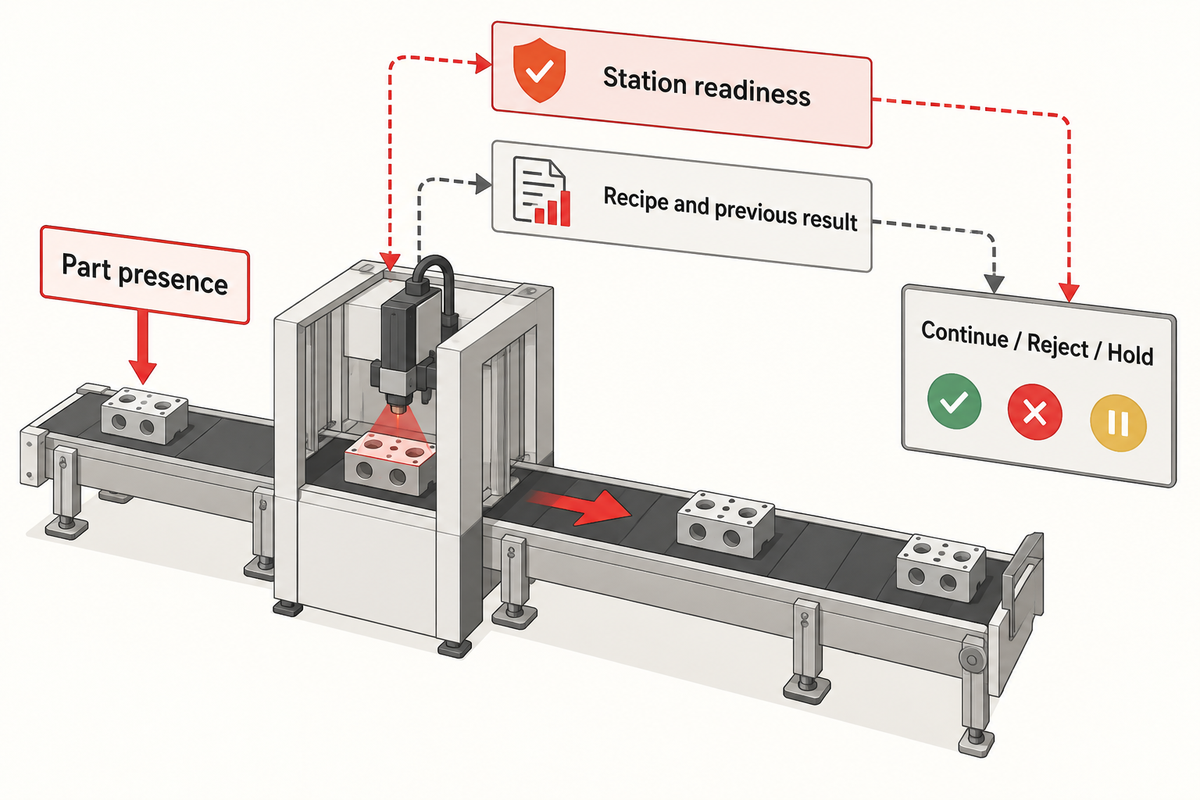
Control signals authorize each operation and part transfer. A programmable logic controller checks conditions such as part presence and station readiness to perform the next operation. Production data tracks the part or batch and tells the next station which recipe to apply and what the last operation’s result was.
Material handling may employ a pallet transport system, a pick-and-place mechanism or conveyor belts. The conveyor system moves the load. Locating devices place it in working position. There’s a difference between a sensor indicating that the carrier has arrived and a measurement indicating that the component is in position.
For example, an assembly process may proceed through loading, insertion, joining, inspection and discharge. A control sequence must distinguish between an empty fixture and a failed assembly. A quality-control result must have a destination: to continue, to reject, or to hold for further evaluation.
The OPC Foundation’s machine-tool quantity definitions distinguish produced quantity from good quantity. Therefore, counting machine cycles alone may lead to overestimating product quality. Monitoring systems need the counter’s meaning, the measurement boundary, product identity and quantity alongside the number.
Two different buffers: a physical buffer stores workpieces; a data buffer stores messages awaiting transfer or processing. A database connection recovering does not move a stalled workpiece, and an empty conveyor does not show that every inspection record reached the database.
Synchronous vs Asynchronous Production Lines
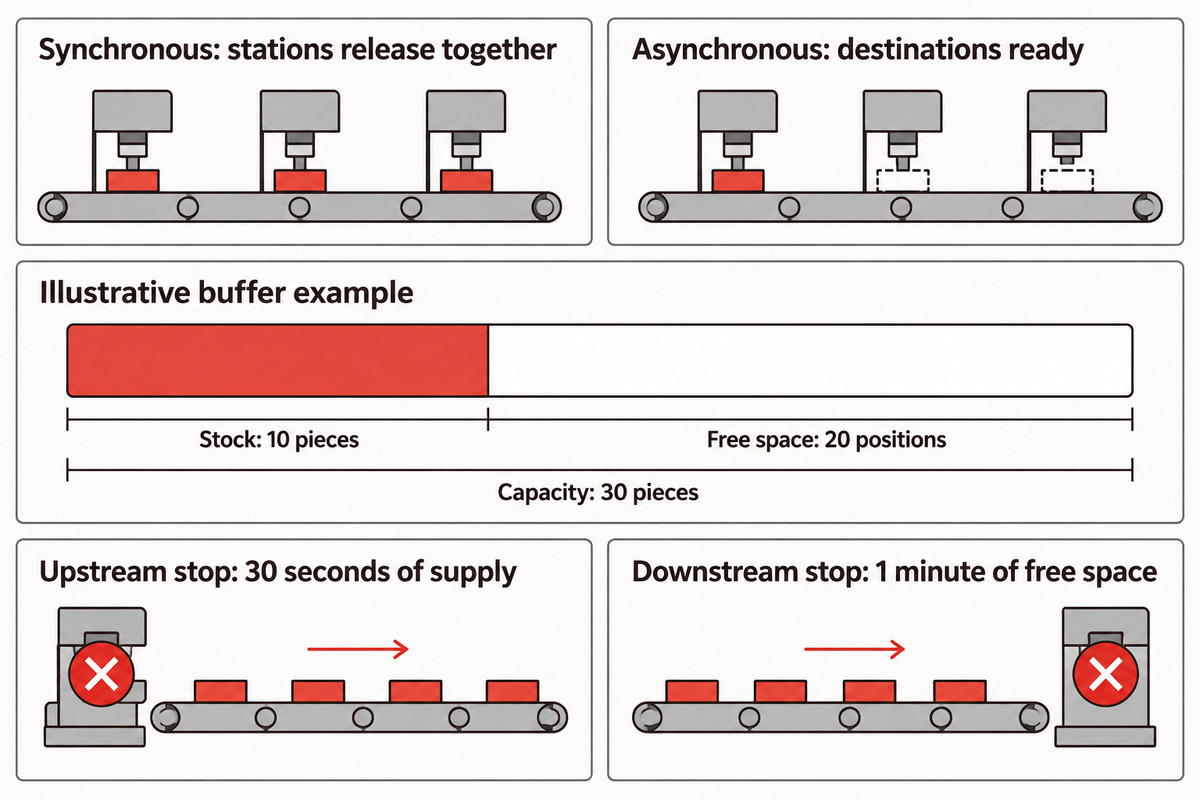
Synchronous lines always move together, and therefore advance their parts together, once all the required operations are completed. Independent advances of stations or carriers are allowed in an asynchronous line, once their transfer conditions are met. Buffers allow neighboring stations to continue to work, despite interruptions, but an empty input buffer, or a full output buffer, stops that decoupling.
NIST’s 2017 multi-product finite-buffer study examines production rate under differing assumptions of reliability and scheduling. It provides results pertaining to a defined manufacturing model. These results don’t establish a general case for determining buffer size for an automated line.
Transfer, layout and automation level describe different elements of a line. A pallet route may include both manual and automated assembly operations. An automatic rotary machine may be considered as a station of an asynchronous route.
| Arrangement | How work advances | Operating consequence |
|---|---|---|
| Synchronous transfer | Stations release together | A delayed required operation holds the transfer cycle |
| Asynchronous conveyor | Parts move when destinations are ready | Accumulation fills or drains as rates diverge |
| Pallet loop | Fixtures carry identified workpieces | Empty-pallet return also needs capacity |
| Rotary indexing table | A shared table indexes between operations | Processing and indexing occupy the common cycle |
| Continuous process | Material moves through a continuous treatment | Residence time and material rate must fit the process |
| Batch station | A group receives treatment together | Batch size and release interval determine average capacity |
| Parallel workstations | Work splits across equivalent resources | Shared handling can limit their combined output |
| Parallel inspection | Several nests test separate pieces | Test duration alone understates capacity |
| Mixed-model route | Recipes or paths vary with the product | Product sequence changes station demand |
| Hybrid manual/automatic | People and machines complete different tasks | Manual replenishment or inspection can pace the flow |
How are storage buffers deployed in automated production lines?
Storage buffers are placed between processes to hold work when there’s a difference in the rates at which work arrives and departs from that process. Stock protects a downstream station when upstream supply stops; free space protects an upstream station when downstream discharge stops. The amount of protection depends on capacity, current occupancy and the rules by which work is transferred.
Example: A buffer holds 30 pieces and has 10 pieces now. Both processes run at 20 pieces per minute. An upstream stop leaves 10/20 = 0.5 minutes (30 seconds) of downstream supply. A downstream stop leaves 20 empty positions, equivalent to 1 minute of upstream work.
A 10-second interruption and a 100-second interruption make different demands on this buffer. Repeated short stops also consume protection unless stock recovers between them. Roque Calvo’s 2026 finite-buffer line analysis considers workstations to be coupled resources, rather than independent machines.
3 Clocks That Explain Line Performance
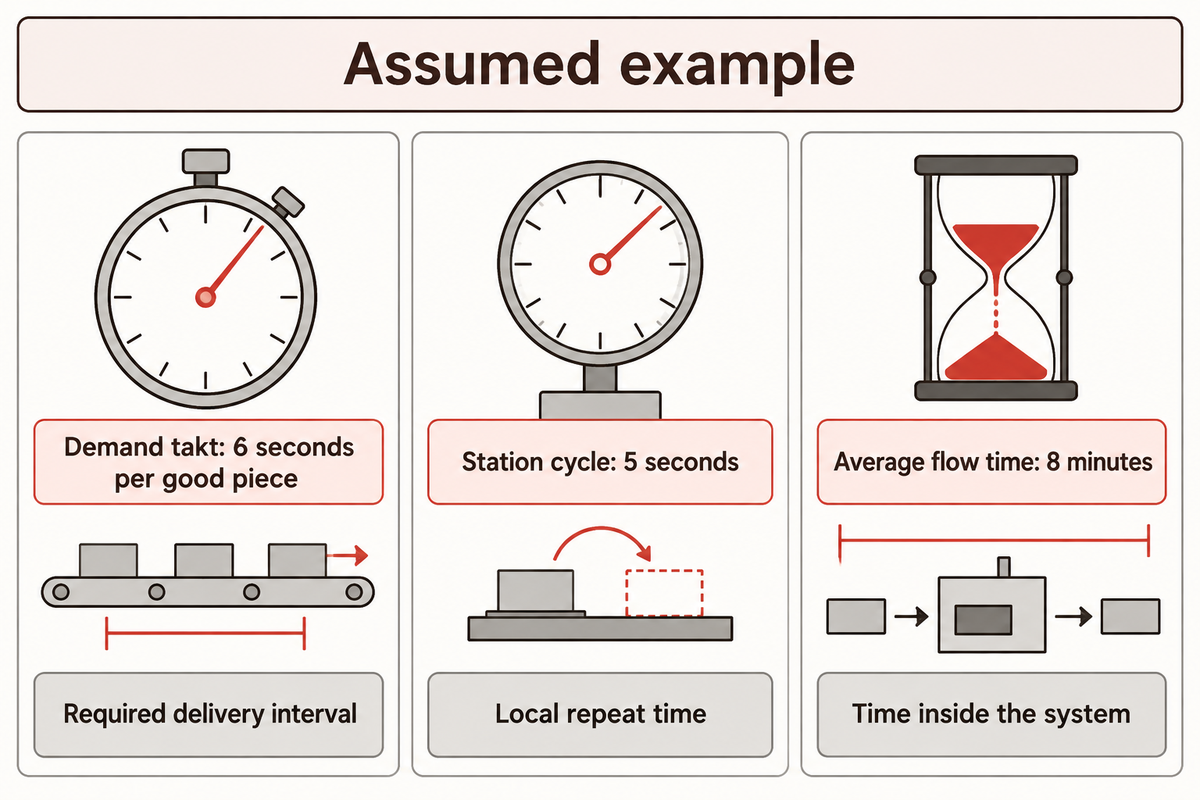
Demand takt refers to the time interval at which a good is required. Cycle time measures repeating machine or station operations. Flow time is the time a workpiece spends in a system, including wait time. A production line can satisfy demand while individual workpieces spend a significant amount of time in the process.
3-Clock Flow Check
3-Clock Flow Check compares demand interval, station cycle and total flow time before assessing line capacity.
“Takt time is a calculation of the available production time divided by customer demand.”
Assumed inputs: Let’s assume 60 available minutes, a demand for 600 good pieces, a station cycle of 5 seconds, and a stable stream which is producing 600 pieces per hour. The average work in process is 80 pieces within the same boundary. Scrap and rework aren’t assumed in this example.
| Clock | Calculation or observation | Meaning |
|---|---|---|
| Demand takt | 60 × 60 ÷ 600 = 6 seconds per good piece | The required delivery interval |
| Station cycle time | 5 seconds per repeated station cycle | Local repeat time, before whole-line losses |
| Average flow time | 80 ÷ 600 hours = 8 minutes | Average time inside the stated system |
The last calculation uses Little’s law. Average work in process is equal to throughput multiplied by average flow time. MIT’s Heineken México systems-thinking case explains this relationship. The inventory and output must describe the same flow; mixing incoming raw parts with only final accepted output breaks the example’s assumptions.
In fixed production transfer lines with no intermediate storage, constant processing times and one piece advanced per station, the common cycle includes the longest required processing time plus transfer time. This rule doesn’t necessarily cover every batch, parallel or mixed-model operation in a production system.
How to Calculate Good Parts per Hour
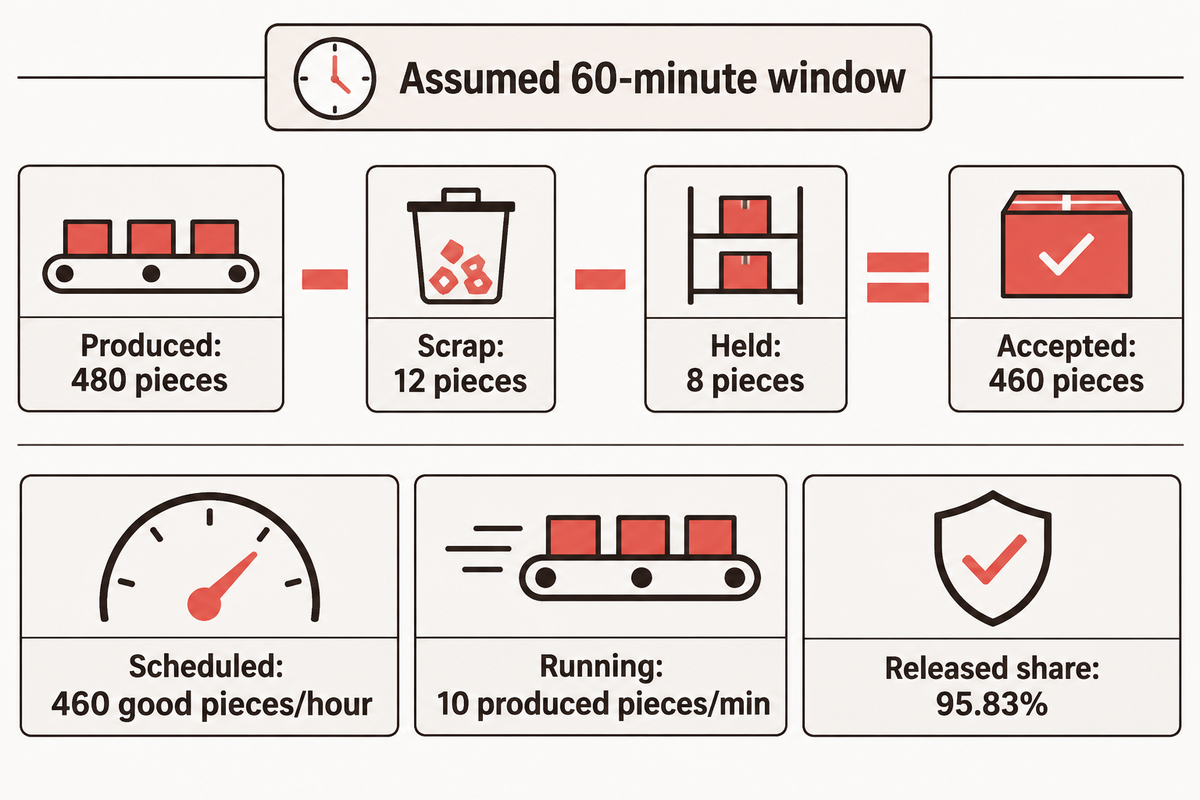
In the good-parts-per-hour equation, divide accepted pieces by the denominator, which is the elapsed time in hours, including stops and changeovers. The calculation assumes that stops are taken in the scheduled time window. A running-only rate calculates throughput during a specific period and answers a different question from scheduled window throughput.
Example: Observe a line for 60 minutes, including 8 minutes of stops and 4 minutes of changeover. During its 48 running minutes, the line produces 480 pieces. The line scrapped 12 pieces and placed 8 pieces on hold. The 460 pieces were accepted.
| Measure | Calculation | Result |
|---|---|---|
| Accepted output | 480 − 12 − 8 | 460 good pieces |
| Scheduled-window rate | 460 ÷ (60 ÷ 60) | 460 good pieces per hour |
| Running-only gross rate | 480 ÷ 48 | 10 produced pieces per minute |
| Released share of produced pieces | 460 ÷ 480 × 100 | 95.83% |
A loss-factor calculation gives the same answer only when its factors describe these same observations: 48 ÷ 60 × 10 × 60 × 460 ÷ 480 = 460 good pieces per hour. Multiplying the accepted throughput by another quality factor would count the loss twice.
The legacy PartsCompleted variable says nothing about quality of the piece. A piece counted as PartsGood can receive an unfavorable quality result on a later machine without the original server revising its history. These distinctions are described in OPC40501-1 v1.02 production-counter definitions.
Separate start-up and recovery periods when comparing stable operating rates. For delivery reporting, retain every minute within the chosen scheduled window. NIST’s transient-analysis study examines time-dependent behavior separately from stable performance in its perishable-product model.
Parallel-test example: Let’s say two independent inspection nests each test one piece in 8 seconds. Their ideal throughput is 2 × 60 ÷ 8 = 15 pieces per minute. There can be various reasons for actual throughput to be lower, for example, a shared bottleneck, blocked exit, or a required retest. An 8-second test is therefore not automatically the line’s finished-piece interval.
Why a Fast Line Still Misses Its Output Target
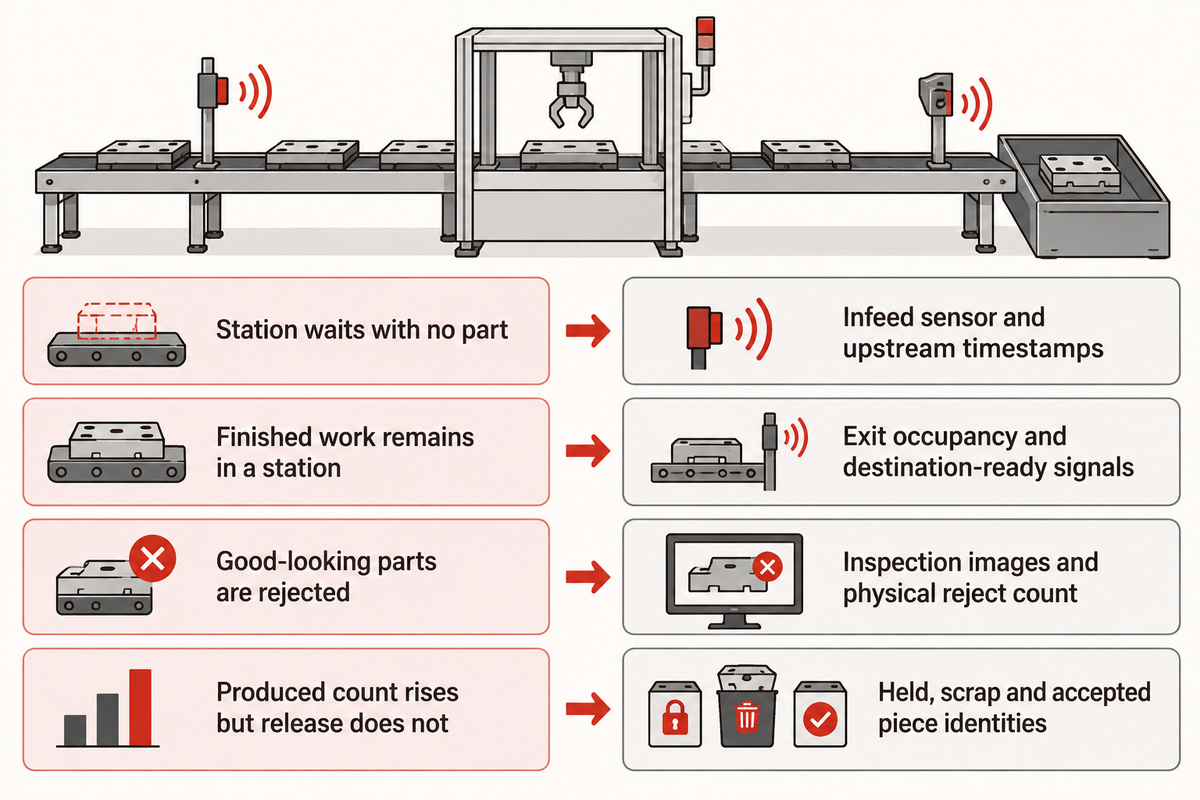
A fast line can miss its target when a required process limits its finished-piece output. This limiting condition can be influenced by the product mix, and can vary. You need to determine where work in process inventory accumulates, where work centers are idle and what comes before an interruption before increasing a machine’s speed.
Why Do Automated Production Lines Fail?
Automated production line systems fail to deliver the correct product when the part is in the wrong condition or the process or recovery behavior isn’t as expected. A missing component, blocked discharge or incorrect recipe can interrupt multiple stations. Completing its own cycle is only one of the many conditions for a product to be discharged.
In a 2022 SDU Robotics vision-trap experiment, a rejection mechanism sometimes removed a nearby correctly oriented part along with the unwanted one. The physical spacing and rejection action mattered alongside the camera’s decision. Increasing inspection speed alone wouldn’t address that particular mechanism.
| Observed condition | Useful record | Next diagnostic comparison |
|---|---|---|
| Station waits with no part | Infeed sensor and upstream event timestamps | Material absence versus a failed transfer request |
| Finished work remains in a station | Exit occupancy and destination-ready signals | Downstream blockage versus local process delay |
| Buffer repeatedly empties | Occupancy trend and upstream stop durations | Available stock against each supply interruption |
| Buffer repeatedly fills | Free positions and downstream discharge rate | Receiving capacity against incoming rate |
| Good-looking parts are rejected | Inspection images and physical reject count | Classification error versus mechanical collateral rejection |
| Produced count rises but release does not | Held, scrap and accepted piece identities | Machine completion against the final quality decision |
| Parallel stations do not add capacity | Loader occupancy and nest cycle records | Independent test time against shared-handler time |
| First-hour output differs from later output | Start-up, warm-up and recovery timestamps | Transient operation against the same stable product run |
| One product runs well and another queues | Recipe, changeover and product sequence | Process demand by product instead of a blended average |
| Faster machinery leaves the same exit rate | Exit counts and queues before/after the change | Nonconstraint speed against the resource limiting output |
Starved and blocked conditions reveal different flow restrictions, as OMAC’s Ron MacDonald explained at PACK EXPO East 2022. Downstream functions must also accommodate the faster discharge used to clear accumulation after an interruption.
Restriction was also found in the scheduling and information updates between brewing and packaging stages in the MIT Heineken case study. The constraint diagnosis was for the entire route as opposed to a machine’s speed rating. Therefore, in addition to cycle time, event timing and the sequence of product flow are needed.
Workplace safety: use recorded events and guarded observation for these comparisons. A stop button is not an energy-isolating device under US29CFR1910.147. Physical jam clearing belongs to trained personnel following the applicable site isolation procedure; bypassing guards can expose people to workplace injuries.
Production-Line Examples Across Industries
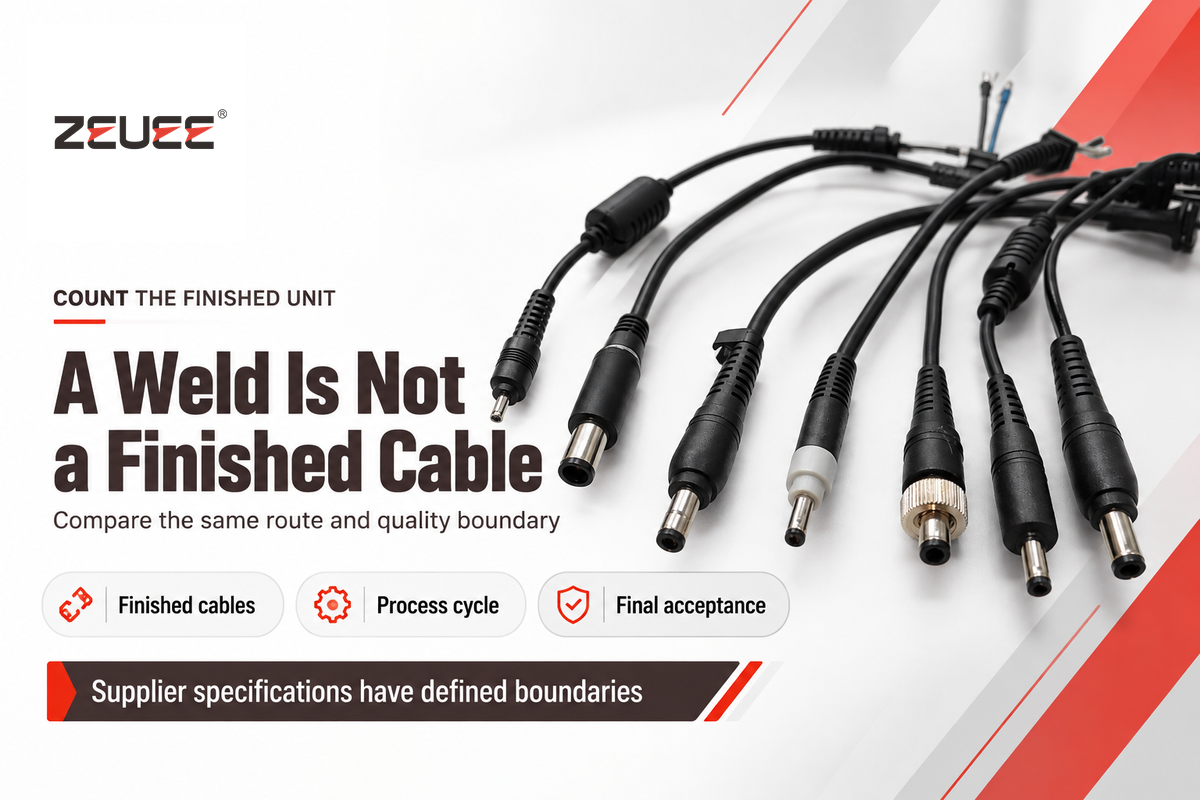
Production line systems are integrated and vary in output and timing. As such, a better benchmark is to look at completed units for the stated production needs rather than another industry’s fastest process cycle.
What are some examples of automated manufacturing systems?
Examples of automated manufacturing systems include cable assembly lines, machining transfer lines, robotic assembly cells and automated filling and packaging systems. Each has a different combination of manufacturing processes. The true distinction is in the route a product takes, and what’s counted at the end of the route, as opposed to whether all processes in the system use the same type of automation technology.
ZEUEE’s DC wire production line lists 10–12 finished pieces per minute and a separate 0.8-second spot-weld cycle. Dividing 60 by the weld time gives 75 weld cycles per minute; finished-cable production also includes inspection, injection overmolding and bundling.
Compare
- Use the same finished product and acceptance boundary.
- Include the selected shift’s stops and changeovers.
- Separate a process cycle from full-route output.
Avoid
- Turning a weld duration into a whole-line guarantee.
- Treating a CNC machining cycle as packaged-product output.
- Combining unrelated manufacturing industries into one nominal speed range.
Automotive transfer lines enable coordination of machining, positioning and inspection. Electronic product assembly may require insertion, joining and electrical checks. An automated assembly line may also retain semi-automatic assembly where manual handling is economical. The NIST multi-product model shows why product mix and scheduling should be included in capacity discussion.
From Operating Requirements to a Defined Line
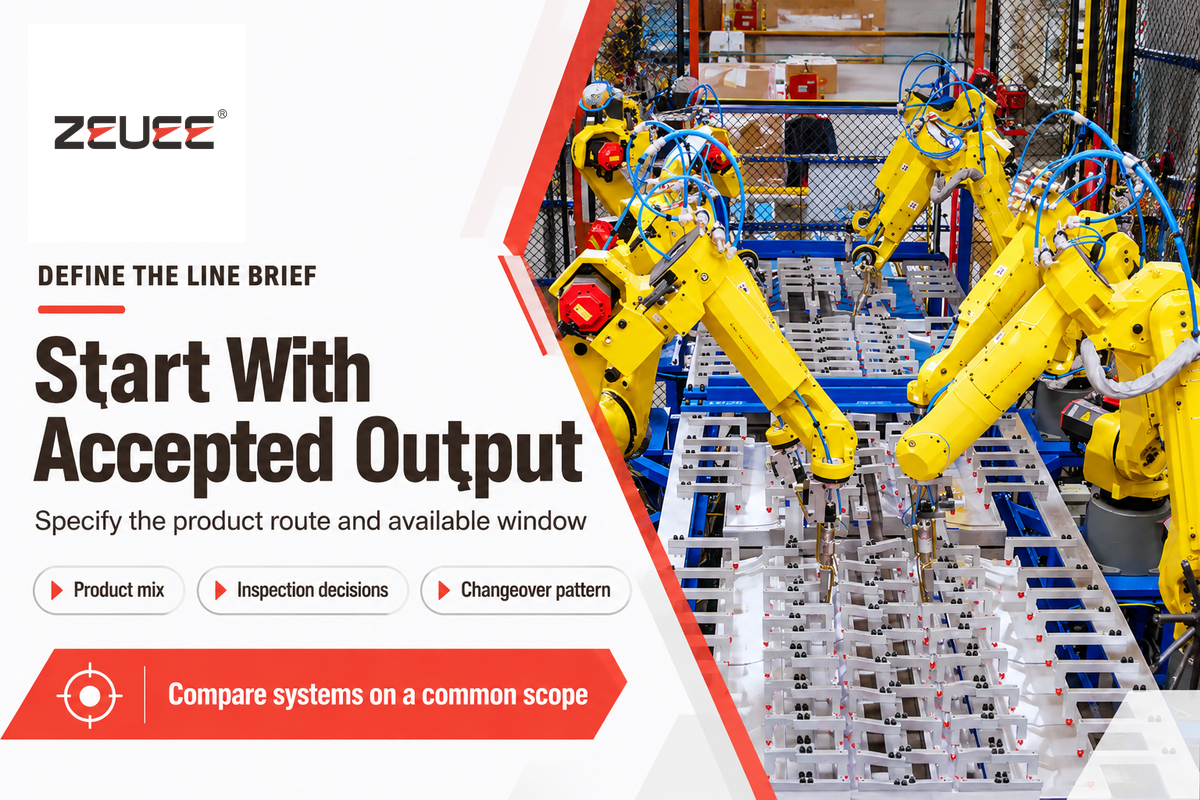
Define the product route, required accepted output, and available production window to select the best automation solution. Consider product mix, inspection, and changeover decisions.
Plant managers require output that fits the schedule. Quality teams require release decisions that can be traced. Finance needs labor savings and cost reduction calculated from accepted output rather than a machine’s best running-only rate. Procurement can then compare automation systems on a common scope.
- List the process operations, inspection locations and final counted unit.
- State available hours and which planned activities remain inside the production window.
- Give batch sizes, variant sequence and changeover frequency.
- Identify feeding, return paths, buffer occupancy and shared resources.
- Separate accepted, rejected and held pieces.
Production rate reflects reliability, buffer and scheduling variables, as analyzed in NIST’s production-rate analysis. For a configured system, use ZEUEE’s automated production line solutions. The production line adoption and return on investment are treated in more detail in the separate production line automation guide.
Industry Outlook: Better Data Needs Better Definitions
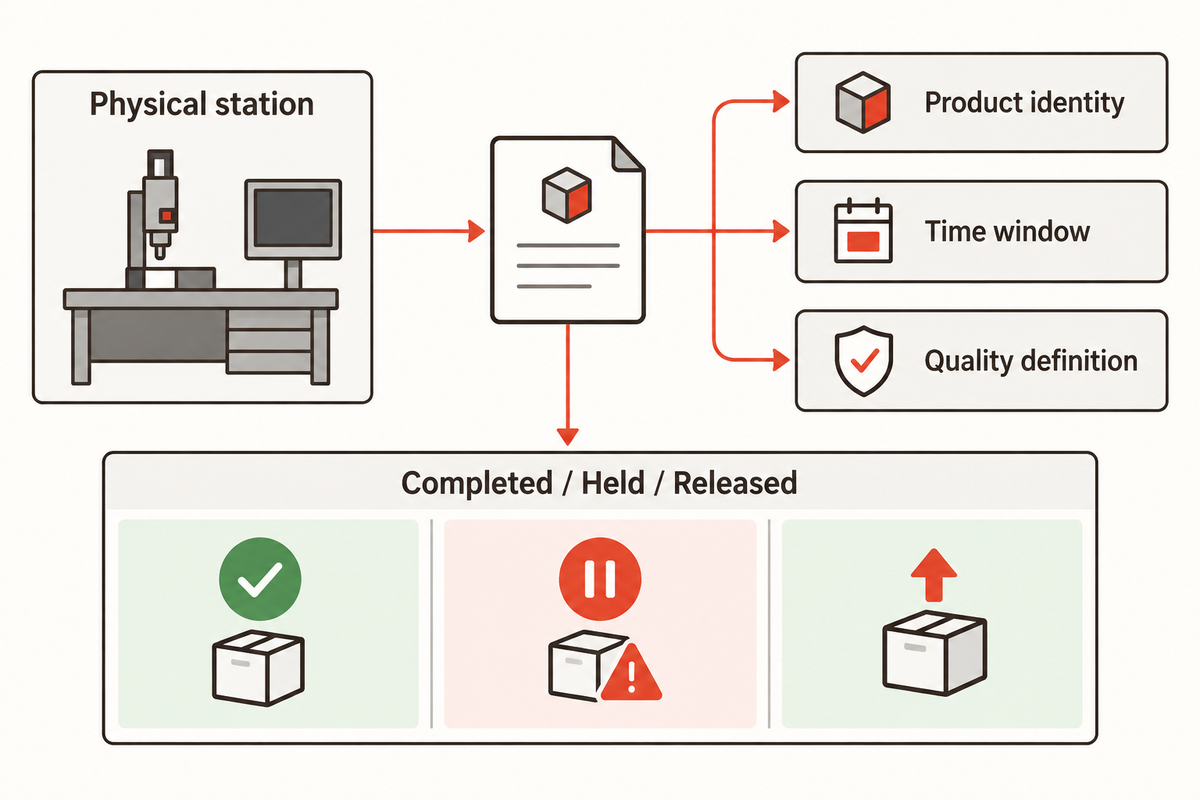
Current work on factory automation includes swapping machine data with clearer common meanings across suppliers. Connected interfaces support monitoring, but a connected count still needs a product identity, time window and quality definition. Industry 4.0 projects improve manufacturing decisions only if the meanings are consistent across machines and the reporting system.
A multi-vendor exercise controlled virtual machines combined into a production line, advancing interoperability and testing, according to the OPC Foundation’s September 2026 update. The update also recorded the July 2026 UAFX V1.00.04 maintenance release.
For an existing line, the process improvement is to map each reported count to its physical station and quality state before merging dashboards and differentiate between completed, held and released quantities. This is required even if all devices communicate over the same network.
Frequently Asked Questions
Will Automation Replace Human Workers?
Automation replaces selected tasks; human workers still handle replenishment, maintenance and exceptions.
Manual assembly can move into a supervised machine sequence without removing every human role. Operators may load material, resolve held products or handle changeovers. Engineers maintain recipes and fault recovery. When implementing automation, assign those duties explicitly so a line does not wait for support that the staffing plan has removed. People and machines must collaborate through defined responsibilities.
What Is a Transfer Line?
A transfer line moves workpieces through a linked sequence of processing stations.
Work handling carries each piece between operations such as machining, joining and inspection. Some transfer lines move all participating parts synchronously. Others allow independent movements and intermediate storage. Fixtures can stay with the workpiece or locating mechanisms can position it at each station. The route, transfer conditions and resource sharing determine how delays spread through the line.
How Does Automation Improve Product Quality?
Automation can improve product quality by repeating controlled operations and checking their results.
A repeatable motion reduces variation only when the part is correctly located and the process settings suit it. Inspection then needs a defined acceptance rule and a working reject route. To improve product quality, retain the measurement and product identity through later operations. A counter that records completion alone cannot distinguish an accepted piece from one awaiting review.
What Is a Robotic Assembly Line?
A robotic assembly line uses robots for selected assembly or handling operations.
Robots may position parts or operate tools while dedicated equipment completes other tasks. Robotic assembly does not require every workstation to use a robot. Feeding, fixtures and inspection still need coordinated timing to support the required finished output and product mix.
Is Automation Only Cost-Effective for Large Manufacturers?
No. Cost-effectiveness depends on repeatable work, usable capacity and the costs the project actually removes.
High production quantities can spread fixed equipment costs over more pieces, but smaller manufacturers can automate a frequent, stable task first. Compare expected accepted output with demand, and include changeover, support and material waste. Greater flexibility can help mixed work, although flexibility and scalability also require suitable tooling and controls. A staged approach may reduce costs without committing every process to one line. Calculate ROI with the same production window and quality boundary used in the capacity plan.
What Components Are Used in Assembly Line Automation?
Assembly line automation uses handling equipment, process stations, sensors and coordinated controls.
A specific build may add robots, inspection devices or programmable motion. AGVs can supply material between areas. Fixtures locate the product during the operation.
What Should Manufacturers Consider Before Automating?
Manufacturers should define demand, part condition and the production route before selecting equipment.
Start with the accepted units needed in the available window. Then identify the process that limits delivery, the variants it must handle and the people supporting it. Increasing efficiency at a nonconstraint station may leave finished output unchanged. To improve productivity, compare exit counts before and after a change using the same product mix. Higher production speed is useful only when the rest of the route can accept it; minimizing downtime also requires addressing recovery and replenishment.
Turn the operating requirement into a line brief
Bring the product drawing, process route, required accepted output and changeover pattern to the discussion. ZEUEE develops industrial automation equipment for connected production and assembly tasks.
ZEUEE’s Manufacturing Perspective
ZEUEE supplies production and assembly automation equipment. Learn about the company’s work on the ZEUEE company profile.
References & Sources
- New Jersey Institute of Technology: Petri net modeling of buffers in automated manufacturing systems
- OPC Foundation: OPC40501-1, Annex C.2.1, Quantity-based KPIs
- National Institute of Standards and Technology: Performance Analysis of Multi-Product Bernoulli Lines with Dedicated Finite Buffers, 2017
- Roque Calvo: Identification of bottlenecks and optimization of throughput for manufacturing serial lines with limited buffers, 2026
- Lean Enterprise Institute: Takt Time
- Massachusetts Institute of Technology: Unleashing capacity at Heineken México with systems thinking from MIT, 2021
- OPC Foundation: OPC40501-1 v1.02, Production
- National Institute of Standards and Technology: Transient Analysis of Serial Production Lines with Perishable Products, 2017
- Haugaard and colleagues, SDU Robotics: vision-trap part-feeder study, 2022
- Automation World: PackML and Machine-to-Machine Communication, March2022
- Electronic Code of Federal Regulations: US29CFR1910.147, Control of hazardous energy
- OPC Foundation: Field Level Communications Corner, September2026
WHY WE WRITE THIS
About ZEUEE Engineering Insights
ZEUEE shares technical guides based on real automation project experience. Since 2005, we have designed and manufactured non-standard automation equipment for connector assembly, wire harness production, robotic lines, vision inspection, and smart factory upgrades.
Founded in 2005
20,000 m² production base
120+ specialists
150+ R&D patents
ISO9001:2015 certified